一、Result 結果頁
組件說明:
實現 Result 結果頁。
效果展示:
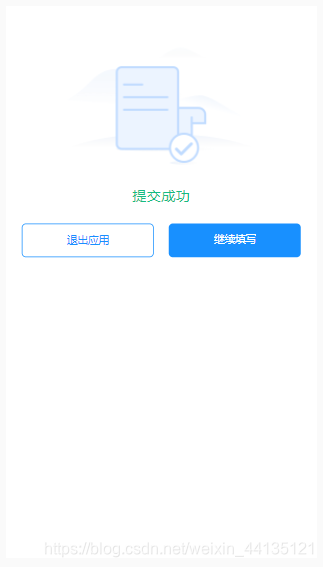
實現的功能:
-
提交或者操作完成之后,進入一個成功或者失敗的結果頁。
-
包含成功或者失敗的狀態插圖。
-
包含成功或者失敗的文案表述(標題及詳情)。
-
包含取消(推出應用)和確定(繼續填寫)兩個按鈕。
二、使用案例
<template> <div> <el-result :item="item" @on-cancel="cancel" @on-submit="submit" /> </div> </template> <script> export default { name: "Result", data(){ return{ item: { title: '提交成功', submitText:"繼續填寫", cancelText:"退出應用", status:"success" }, } }, created(){ let item = this.$route && this.$route.query; if(item.status==='fail'){ this.item = { title: '提交失敗,請聯系開發人員', submitText:"重新填寫", cancelText:"退出應用", status:"fail" } } }, methods:{ cancel(){ dd.biz.navigation.close({ onSuccess : function(result) { }, onFail : function(err) {} }) }, submit(){ this.$router.go(-1) } } } </script>
-
1
-
2
-
3
-
4
-
5
-
6
-
7
-
8
-
9
-
10
-
11
-
12
-
13
-
14
-
15
-
16
-
17
-
18
-
19
-
20
-
21
-
22
-
23
-
24
-
-
43
-
44
-
45
-
46
-
47
-
48
-
49
-
50
三、API 使用指南
|
屬性
|
說明
|
類型
|
默認值
|
|
item
|
頁面展示的靜態內容集合
|
Array
|
[]
|
|
title
|
描述標題
|
String
|
–
|
|
submitText
|
提交按鈕文本
|
String
|
–
|
|
cancelText
|
取消按鈕文本
|
String
|
–
|
|
status
|
輸入值字段
|
String
|
–
|
|
on-cancel
|
取消按鈕事件
|
Function
|
–
|
|
on-submit
|
提交按鈕事件
|
Function
|
–
|
四、源代碼
Result.vue
文件路徑:share/result/Result.vue
<template> <div class="cm-tx-c cm-mt-08 cm-p-02"> <el-image :src="item.status==='success'?successBg:failBg" style="width: 250px" > <div slot="placeholder" class="image-slot"> 圖片加載中<span class="dot">...</span> </div> </el-image> <div :class="item.status==='success'?'success-title':'fail-title'">{{item.title}}</div> <div>{{item.describe}}</div> <div class="cm-flex cm-jc-sa"> <div @click="cancel()" class="cm-btn-cancel">{{item.cancelText}}</div> <div @click="submit()" class="cm-btn-submit">{{item.submitText}}</div> </div> </div> </template> <script> import successBg from '../images/result-success.png'; import failBg from '../images/result-fail.png'; export default { name: "ElResult", data(){ return{ successBg, failBg } }, props:{ item:{ type:Object, default:{} } }, created(){ }, methods:{ cancel(){ this.$emit('on-cancel',''); }, submit(){ this.$emit('on-submit',''); } } } </script> <style scoped> .success-title{ padding: 0.4rem; font-size: 0.35rem; color:#15bc83; } .fail-title{ padding: 0.4rem; font-size: 0.35rem; color:#f25643; } </style> 6
轉載 作者:杏子_1024 2020-10-19 09:24:19 分類專欄: # Vue通用組件封裝